
I am thrilled to be collaborating with CVS Pharmacy to promote #BetterHealthMadeEasy and share ways to #FindYourHealthy. I express my personal view, and all assertions about products or program specifics should be verified via CVS.com or by contacting the manufacturers directly.
Recently, my schedule has been packed. My daughter just finished her dance recital, followed by National dance competition preparations. The life of a dance mom is anything but boring, especially during competition season!
As we went shopping for last-minute essentials for our Nationals road trip, my daughter reminded me that she needed to create a door sign for her “big sister.” With time being short, we hurried to gather supplies and hoped to innovate something creative. That’s when Emma decided she wanted to include a photograph of them together.
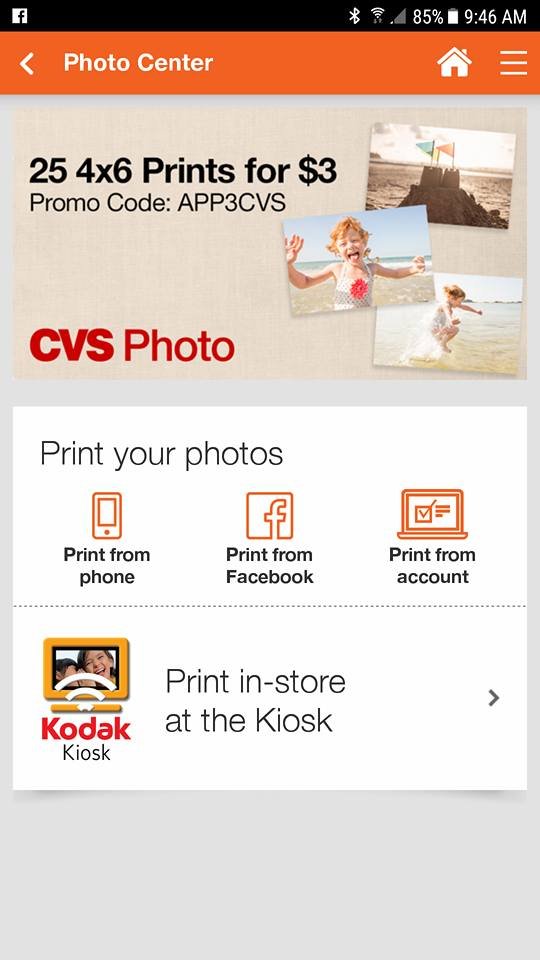
I usually would feel frantic given our time constraints, but thankfully, I remembered that I had an adorable picture saved on my phone. I could conveniently place a print order using the CVS Pharmacy App while still out shopping. In the Photo Center, you can upload your cherished photos from your phone or even Facebook and collect your prints at the store with ease.

After completing our shopping, we stopped by CVS on our way home. Our print was ready for pickup, and the whole ordering process took just a few minutes, allowing Emma to incorporate the photo into her door sign.

In today’s digital age, having a physical print is refreshing. You can frame it, keep it on your fridge, or carry it in your wallet. I can think of numerous occasions when this service would be beneficial, such as visiting my dad, who’s not very tech-savvy; he would appreciate receiving prints of his grandchildren to show off.
As you can see, Emma’s “big sister” adored her poster, and Emma was so pleased with how it turned out. The CVS Pharmacy App truly came to the rescue!

The CVS Pharmacy app offers a variety of features to simplify your life:
· Pharmacy: Easily manage your and your family’s medications. The app allows customers to scan prescriptions, set medication reminders, transfer prescriptions, and check for interactions, enhancing privacy during pickups.
· Deals & Rewards: Forget about diving into coupon books! The app tailors personalized deals based on your buying habits and automatically applies them to your ExtraCare Rewards card.
· Photo Center: Upload pictures from your phone or Facebook and retrieve prints at the store hassle-free.
· Shopping: Purchase your favorite items through the app, including reordering past orders with ease.
· Find a Store: Regardless of your location, quickly locate the nearest CVS Pharmacy.
Check it out and download it today!
Comments
Add Your Comment Cancel reply



Sarah L
says
It’s good to see that you could quickly get your photo. No CVS in Colorado.